Deprecated: ProcessWire\MarkupQA::__construct(): Implicitly marking parameter $page as nullable is deprecated, the explicit nullable type must be used instead in /var/www/vhosts/veravandeseyp.com/type.veravandeseyp.com/wire/core/MarkupQA.php on line 74
Deprecated: ProcessWire\MarkupQA::__construct(): Implicitly marking parameter $field as nullable is deprecated, the explicit nullable type must be used instead in /var/www/vhosts/veravandeseyp.com/type.veravandeseyp.com/wire/core/MarkupQA.php on line 74
Deprecated: ProcessWire\MarkupQA::findLinks(): Implicitly marking parameter $page as nullable is deprecated, the explicit nullable type must be used instead in /var/www/vhosts/veravandeseyp.com/type.veravandeseyp.com/wire/core/MarkupQA.php on line 623
The interview discusses Schultzschultz's work, including the development of their own software tools. Studio co-founder and designer Marc Schütz shares his experience with AI, the challenges and limitations he has encountered, and his thoughts on the future of AI in design. He also discusses the release of their tools to other users and the unexpected ways in which people have used them.
Hey Marc, it’s great to meet you! I’m a big fan of your work. Could you briefly introduce yourself and your practice?
I’m Marc Schütz. I’m a creative director at Schultzschultz and a co-founder of the studio. My business partner, Ole Schulte, and I founded the studio in 2007, so we’ve been around for a while!
We started working mainly for electronic music and fashion design clients. One part only involved the acoustic visualizing of electronic sound. The other part was fashion, which included a lot of photographs of beautiful people wearing beautiful clothes, and we had to find typography and graphics to accompany these images. This combination was the starting point for our studio, and it coined our approach. Since we didn’t produce fashion photographs and had to use a minimal digital graphic approach for electronic music, we wanted to reduce our design to the most basic design elements we could apply to these different topics.
From that moment on, our work was heavily focused on typography. You can’t spare text if you make a poster; if it’s not just an illustration, you must always have a text layer. If you make a record sleeve, at least back in the day, it was mandatory to have the artist and the name of the record on the cover. We wanted to get rid of everything optional. So, we developed a style of typography that serves different purposes. You can read it (at least, more or less), but at the same time, it reflects the style of the music, connects to the style of the clothes, and serves as a graphic element. The idea came from the electronic music part of our work. If the music was produced with the computer as a tool, we should also make the graphic design digital. We should recognize the inherent restrictions of the computer as a tool in the design. Today, everything is electronic because everything is produced digitally, but in electronic music, the sounds are not natural most of the time. They are digital and they are abstract, that’s something we wanted for the graphic design too. And so we played around with these aesthetics of computer graphics, vector or path shapes, bézier curves, and raster effects.
So, we rasterized the effects that we applied because these elements come naturally when working on a computer. It’s part of this digital description of visuals, which has pixels and mathematical curves with specific properties inherent to the medium. For instance, the way a bézier curve deforms is digital. That approach led us to creative coding because it was easy to produce interesting work with very simple pieces of software. We were not using big company applications like Adobe Photoshop and Illustrator because they try to mimic an analog workflow. Photoshop: the name says everything. It’s not like a pixel editing tool; it says Photoshop. So it’s something different, and we started writing our own software to create something that works in its own little world.
When did you start making your own software, and in what language?
My first computer was the Commodore 64, which I inherited from my brother in the 1980s. Later, I got a Commodore Amiga 500. As a teenager, I did some simple graphic design on it, like making circles and shapes.
I started writing code when I was working at a graphic design studio, and I learned Macromedia Flash. That software was used for websites with vector-based graphics on the Internet. You could use your own fonts in it, which was uncommon back then. With most programs, using your own fonts was impossible, but in Flash, it was possible. It used a language called ActionScript in it, which could do things like getProperty and setProperty.
I wrote my own little digital tools in 2001 with ActionScript for my application to the art university I attended later on. I used the Flash environment to create graphics instead of making websites, which was the original purpose of the software. Some years later, a fellow student at my university was doing an internship at the company of Ben Fry and Casey Reas at MIT. He told me, “Since you’re using ActionScript, have you ever heard of Processing? It’s a cool software specially made for visual artists and creatives who write basic or simple code. It’s made for people who are not necessarily great IT minds but rather creative minds.”
And that’s when I started writing most of my prototypes in Processing. I still use it because you don’t have to cope with versions or other complexities. We also use Xcode and Swift programming in the studio sometimes, but that’s always a hustle. It’s much more powerful, but at the same time, there are so many dependencies. It takes a long time to get to the point where you get a little window on the screen that shows you the visualization of your idea.
With Processing or p5.js, you can kickstart your visualization by just writing a few lines of code. At some point, we might realize that the performance is insufficient for a project. Then, we translate our idea to a different programming environment or language. Most of the time, we don’t have to because our design is quite minimal, and we don’t need to use many 3D environments and renderers. So often, our work stays in the Processing or p5.js environment.
Has the way you write code changed in the past two years?
Last week, I wrote my first small digital Processing tool, entirely using ChatGPT. I challenged myself not to write a single line of code and not to edit anything either. I didn’t want to use ChatGPT for only certain parts of the code; I wanted to start a project from scratch and work on it with ChatGPT as the sole programmer. A part of the process worked great. I talk to the model like I’m a programmer talking to a programmer, so instead of telling it, “I need software that makes colorful images,” I tell ChatGPT, “Please write code: I need a class that has to have certain parameters and certain functions, and I need another class with other parameters, and so on.” So, I’m talking to it on a code level. That is really quick because I don’t have to type the code myself.
I think faster than I can type. When I’m thinking about the architecture of a piece of software, it takes a while to write it down. I also make small mistakes sometimes, like leaving out a bracket. It takes a while to trace that back, and the moment I find it, I’m already at a different point in my mind. I always think about the next feature and the next function, and ChatGPT speeds up that process well.
But there are some invisible glass ceilings. When you hit a ceiling like that, you wonder why ChatGPT isn’t working as expected. For instance, when working on bézier curves, which help to construct shapes as you do in OpenType fonts. When I tried to use ChatGPT to develop something with bézier curves in Processing, it was completely unable to find any solution, even not for the easiest tasks. It was wild to see that it could work extremely well for some Processing functions – without any problems or errors most of the time – but the model was completely lost when I asked it about bézier curves. It was unable to do it, so I stopped using ChatGPT for it.
I have the same experience with Stable Diffusion software, for example. Creating a certain set of images is easy, and it looks great. You think it can visualize anything. But sometimes you have a certain idea, something you can visualize in your mind really easily, and it’s just impossible to get this out of the model. It’s like there is some block within the AI, and it’s not even a restricted NSFW block. It doesn’t allow the creation of very unusual prompts. It’s just something that might be too uncommon, or it’s an area of the visual world that was not included in the training data.
It’s funny because it’s almost like interacting with real people. When you get to know people who seem very smart, you can talk with them about anything like history, arts, and music. But then you change to a different topic, and they know nothing about it at all. Okay, that’s not your topic, let’s talk about something else. I feel it’s the same thing with these generative models. You can’t look inside, so you don’t know. Sometimes, it’s surprising, but it’s really hard to anticipate.
It reminds me of this occurrence I had with Dall-E when you asked it to make an image in the style of a line drawing. Any moment you prompt the word drawing, a pencil, a pen, or even a hand will appear in the image, and there’s no way to get it out. There’s no way to do a negative prompt, like drawing but do not show a hand.
Exactly! I’m experimenting with Stable Diffusion in ComfyUI. It’s an interesting, open-sourced, node-based interface. You can download it, use the open-source stable diffusion models, and build your own Midjourney, Dall-E, or Adobe Firefly. You basically build your own workflow or pipeline. And with that flexibility, there are ways to solve these problems. With the standard interface of Dall-E, Midjourney, Adobe Firefly, and such, you can only enter positive text prompting, so you have to do a lot of push and pull and nudge the model to create a certain image. The interface of most proprietary and mainstream generative AI applications is very, maybe too, straightforward.
John Maeda once wrote a little book called Simplicity, and he discussed the problem of flexibility and usability. All these Generative AI applications are very usable but not flexible enough. You don’t have a lot of buttons that you can push. You can’t get the results you could get out of the model at some point because you don’t have access to the strings you can pull.
ComfyUI is the opposite of this, it’s not very usable. If you look at these workflows at first, they seem really difficult to use. But you can just build your workflow. So you could use Dall-E or Midjourney but with much more profound control over this generative AI technology. But it also comes with some errors at first and the first images you generate with it often look terrible. However, if you learn how to adjust your parameters and use all the components, it’s very interesting.
You’ve been using generative AI in your work. Does AI ever give you anxiety, or does it only excite you?
It’s totally addictive. At first, I watched the development of visual generative AI like Midjourney and Adobe Firefly from a distance and thought to myself, “Let’s see where this goes.” About one and a half years ago, a startup approached the studio. They developed an application for industrial designers to create lots of iterations and variations of designs of objects. They wanted us to help make the corporate design and counsel on the interface design. I asked them to give me an in-depth look at the technology behind it. That is how I got into working with stable diffusion technology.
Finding the ComfyUI interface was a big breakthrough in my process because it was more accessible than writing Python code for a non-IT person like me. I understand Python but don’t understand all the dependencies and problems that can arise with these AI pipelines. It’s tough for me to figure those errors out, but ComfyUI consists of nodes that are part of the software. So one node loads a basic model, another represents the text prompt, another the encoding and tokenization. Another node can be a sampler and output an image. That node-based interface is very visual, so I understand how the software is built. And at the same time, these nodes already have many fallbacks built in. They are very timed, and you get real error messages that help you figure out what’s wrong.
So in using ComfyUI, my frustration level was extremely reduced to a level where I could build my own workflows. Now that I have developed some workflows to create images with, I can make every image I can imagine. It just takes some time, but I will never hit that glass ceiling because I am able to expand my software. So I can find new nodes or new models when I want to work things out further. It gets more complex, but I am able to find a way to create every image I can imagine.
So now it’s like a clay ceiling.
Yeah, now it works for me! I’m a little addicted because I have some workflows that are so much fun and easy to use. For example, I just posted something on our Instagram a few days ago. It’s the Star Wars Stormtrooper with different outfits. It’s so easy to create specific images and use them as prompts.
As you said earlier, when you try to prompt a drawing, a hand and a pencil show up, maybe because you prompted “drawing.” What you actually mean is the “drawing style of the image” and not somebody drawing. That is the most interesting part of generative AI to me: this association of things that are linked semantically because there is some logic or understanding in this model.
If you create, for example, an image by prompting a person wearing a red scarf and you don’t prompt anything about the background or the weather, it most likely rains or snows, because why should you wear a red scarf on the beach? It makes total sense, but sometimes it nudges you into a direction that you don’t expect, and you have to find linguistic ways around that. You need to explain things so the model doesn’t misunderstand.
People say that generative AI will replace photography and illustration. I don’t think so. I think it’s different. After one and a half years, I still haven’t completely figured out how to wrap my head around generative AI. What is the character of this technology, and how can you use it in your work? Some of the output really looks like a photograph. You could also do drawings and illustrations or abstract graphics. But it’s not the same as the real thing. If you send some of these images as photographs to post-production, they zoom in and call you back like, “What the f***? What is this shitty thing you have sent us?” And it’s really hard to create something minimal, geometrical, or graphic elements.
I think generative AI is like CGI, like 3D software. It’s great for some purposes, but after over 20 – 30 years of CGI software, you still recognize the character in the movie that is not filmed: it is generated. It’s still not the real thing after all this time. It’s the same with AI; all these technologies have strengths and weaknesses. Now is the time to figure out what the strengths of AI are and how we can use it in a good way without losing quality in illustration, quality in photography, or typography and graphic design. There are already applications for that, but it’s not the real deal, so how should we include this technology in our practice?
It’s interesting to hear you talk about these explorations. We’ve been talking about AI now, but I’m also curious about tools because they seem to be a big part of your practice and studio work. You mentioned that you build tools as part of your process. And I’m wondering, how do you release tools to other users? And what is your experience with that?
We used to make tools just for our practice for a while and kept them on our computers, like in a digital drawer. If we needed a tool we built, we would use it. About six years ago, we started to get busy on Instagram, and we released a lot of experimental stuff, even made with tools that we may never have used for a real-life project. We did these experiments for ourselves and just published them on Instagram, so it has some purpose, after all. The first comments asked what application we used, people wanted to learn how to do something like that themselves, and what software we used. I don’t know how often I replied, “It’s self-made software; we’re using Processing.” Then, of course, the following comment was, “Can you make it open source? Where can I download the software?”
At first, we were a little bit like gatekeepers with the tools. We’re not IT people; we are designers, and we felt uncertain about the quality of the code. It worked for us, but was it ready to publish? What if people had difficulties using the code? We thought a lot about how we could give the code to other designers while not staying responsible for it. If you sell something, you’re responsible because people spend money on it, and if it crashes, you are the one to fix it. We wanted to release stuff in a very uncomplicated way. So, we translated some of our scripts from desktop Processing to p5.js, which runs in the browser. We have a “tools” section on our website. You can find some scripts there that we translated to p5.js to make them accessible to other designers for free. If you know your way around the browser, you can also download the code. So it’s open source; it’s not encapsulated in an iOS app.
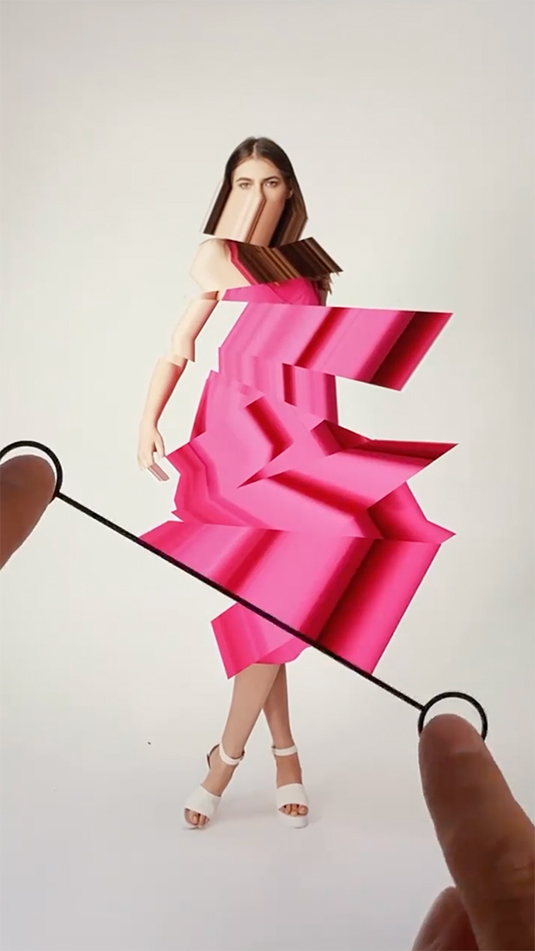
The reactions were great. One example of how this went is what happened with a very simple tool we made. I still wonder why it became so successful; somehow, it is still the most used tool of all the tools we released. You use your finger (or the cursor) to draw a black-and-white drawing; it gets rasterized, and the pixels get rounded. You can download the image as a PNG. It’s so simple, that you could easily do this in Illustrator.
This one effect is nothing special, but people used it so often and in unexpected ways. You only have two functions: draw and erase. People drew something and erased something, then they drew something more and erased more, and they downloaded all the stages of their drawing to get a stop-motion animation. We saved copies of their work on our server to see what was happening with our tool. It was thousands of images, but as we skipped through them, we saw a small preview of a cat jumping. We said to ourselves, “Oh my God, what was what? This is an animation.” Then we realized that people just figured out that if you draw something, then something more, and you download all the images, it’s a straightforward way to create a stop-motion animation. In German, we call it “Daumenkino,” thumb cinema. It was such an obvious way to use this tool, but we never thought of it. We never thought you would use this tool as a stop-motion animation tool, but many people used it that way, and it worked perfectly.
There is the tool, and there is the person who uses the tool, and interesting work comes from that combination. And it’s never only the person, and it’s never only the tool: you need both. Then a synergy happens, and that’s the most significant takeaway from releasing these tools. If we keep the tools for ourselves, they are only used in one certain way. We always do the thing that we imagined doing with the tool when we created it, but you can use the tool in so many different ways and create so many different styles, even with just a very simple tool. It’s really rewarding and interesting to see when people publish the work they create with our tools on Instagram. It’s like, “Oh my God, look what they did with our tool. It’s so different from our style and from what we were aiming for.”
It’s great that you’re doing that. It’s great to hear about what experience you got from it because publishing these things is a lot of work.
I’m in the Future Sketches group with Zach Lieberman, and we always ask this question: What tools do you wish existed? It doesn’t have to be a realistic tool. It can be something very big or very small, too. Is there something that you wish existed that would make your life or work easier?
There are many answers. I get bored very easily. Often, when I finish one of our tools, after working on it for days or months, I do a handful of designs with it, and then I lose interest. I realized it’s capable of doing the stuff I wanted, and that’s cool. I can imagine what I could do with this tool, and then I lose interest and get a new idea. Sometimes, I develop a tool, and we only use it to post on Instagram once or twice. After that, it is placed in a drawer with all the other tools I developed before.
Thinking of only one perfect tool is very hard, but since we talked about using ChatGPT for programming, I think the ideal tool for me would be a perfect coding wingman. A model that understands what I want from a tool, that you could work on code together with, and that speeds up the process of creating tools. I will never be finished with making tools; they are like music or movies. There are endless movies; you will never be able to watch all the good movies that exist. The same goes for music. But human culture is to express yourself again, and again, and again. Digital tools are also a form of self-expression. My ideal tool would be a tool that helps to create new tools because I could realize a lot more ideas that I have.
The most limited resource is time. You cannot expand your time, at least for now. I don’t know of ways to extend your lifetime drastically. Time is such a valuable resource. If you have an idea, now you can only take a note in your sketchbook so you don’t forget about it, but with a tool like that, you could just take 20 minutes a day to write the code to make this idea work. That would be really great for me because I never run out of ideas, but I run out of time. I talk for a while and then it is suddenly 15 minutes later!
Deprecated: ProcessWire\Pageimage::extras(): Implicitly marking parameter $value as nullable is deprecated, the explicit nullable type must be used instead in /var/www/vhosts/veravandeseyp.com/type.veravandeseyp.com/wire/core/Pageimage.php on line 1779