Deprecated: ProcessWire\MarkupQA::__construct(): Implicitly marking parameter $page as nullable is deprecated, the explicit nullable type must be used instead in /var/www/vhosts/veravandeseyp.com/type.veravandeseyp.com/wire/core/MarkupQA.php on line 74
Deprecated: ProcessWire\MarkupQA::__construct(): Implicitly marking parameter $field as nullable is deprecated, the explicit nullable type must be used instead in /var/www/vhosts/veravandeseyp.com/type.veravandeseyp.com/wire/core/MarkupQA.php on line 74
Deprecated: ProcessWire\MarkupQA::findLinks(): Implicitly marking parameter $page as nullable is deprecated, the explicit nullable type must be used instead in /var/www/vhosts/veravandeseyp.com/type.veravandeseyp.com/wire/core/MarkupQA.php on line 623
Needs
“We need to create typography that's adaptive in response to its environment.” —Beatriz Lozano, Lunch Lectures: Computational Typography (2023)
How will we create and interact with typography if we are moving away from a desktop computer paradigm?
Changing from the desktop computer paradigm to anything else might be nearly impossible since so many things rely on it. The problem with many new experiments is that they may be logical but not intuitive initially. If a technology requires a steep learning curve, adoption might be hard, which is something I notice when I teach my students to code. Designer and artist Andreas Gysin also noticed this when he released his ASCII Playground, everybody just copied the examples and didn’t make an effort to adopt the code.
So what about interactions that already feel intuitive? Motor skills that preceded learning a type system like a keyboard in the cognitive process when we grow up might get pretty close. Humans have lived in physical environments; our brains are geared to that model. What if our computers could recognize gestures and parts of our body? This would give us many more data points to work with than just one cursor or a set of keys. Perhaps we could use gestures to interface with datasets or browse the web, like in the movie Minority Report (2002)—ideally without the dystopian plot line.
Deprecated: ProcessWire\Pageimage::extras(): Implicitly marking parameter $value as nullable is deprecated, the explicit nullable type must be used instead in /var/www/vhosts/veravandeseyp.com/type.veravandeseyp.com/wire/core/Pageimage.php on line 1779
 Interface in Minority Report (2002)
With respect to type design and lettering, this live interaction could be great for calligraphy. This is much harder to do with a computer mouse, although styluses and digital drawing pads make it easier. Another great additional use would be defining motion for animated typography, which otherwise needs to be mapped with software or a piece of code. Type designer Tra Giang Nguyen (Gydient), mentions that she needs to be in a bright and sunny space. Wouldn’t it be great to do design work outside instead of at a desk behind a laptop? Of course, we are still locked to screens for now, but one can dream.
 Palmer’s Guide to Muscular Movement Writing, A. N. Palmer (1988)
 Digital Typography, Donald Knuth (1979)
This sci-fi mixed-reality plot is already reality. Apple’s Vision Pro (and some non-Apple VR headsets that precede it) promises to “seamlessly blend digital content with your physical space” with what they call spatial computing. However, as the product is still quite new, third-party apps are ruled out for safety reasons [Apple 2024]. And of course, there is still a screen between you and that tree outside, just closer to your face. Designer and coder Kiel Danger Mutschelknaus mentions, “Being able to manipulate graphics in a space without having to download it on your phone or observe it through a screen or with goggles would be so magical.”
Designer Beatriz Lozano approaches this same concept from a different perspective. “We need to think about designing typefaces that adapt to their environment”, she argues. This could either be done artistically, like lettering that adapts to audio, or from a functional and accessibility standpoint, like typefaces that can change dynamically in AR or VR, depending on who reads it.
Moving to a new user interface paradigm can be difficult if it is not intuitive. There is some potential for intuitive approaches using input like pose, speech and gestures that we are used to as humans. This could help people design with other interfaces and in other spaces, but also design for other spaces.
History of Type and Interaction
Like type, many elements in our electronic hardware also have embedded traces of history. However, when it isn’t for aesthetic purposes, it is a question of whether that is desirable at all beyond the “woah, neat”-effect.
 The Oliver Keyboard instructions (1911)
 Remington Typewriter Layouts 1100–1300 (1911)
The order of the keys on the keyboard that I have been using to type this, for instance, dates back to the physical typewriter. Characters that were often used were spaced apart, to ensure that the typewriters wouldn’t jam. It gets even more complicated for Chinese characters, for which a five stroke input method is used that classifies characters by their structure rather than their pronunciation [Adler 2020]. Even with these complex systems, jamming is nearly impossible with digital keyboards. It only happens in rare scenarios, like when you have a cat, and it sits down on one of the keys for too long.
 Catproofing your computer (Source: WikiHow)
 Elderly couple moving a computer mouse to the top right of the screen, Planet Internet “Moderne Technieken” commercial, 2005
The same goes for the computer mouse. We use our whole hand to move one data point on the screen. It’s not the most efficient method, but it is extremely intuitive once you get the hang of it.
 Computer mouse patent (1968) (Source: archive.org)
 Computer mouse prototype by Bill English from Douglas Engelbart’s sketches (1968)
Of course, I am not the first person to consider that some of these technologies feel a little outdated. A whole section of the Human-Computer Interaction (HCI) field is dedicated to this challenge. Researchers have developed many experimental technologies that challenge the paradigms we are used to. For example, Dasher, one of my favorite experiments, proposes a way of writing not by typing, but by using the mouse and a large language model to navigate text (2011).
Contemporaries
An accessible, lightweight solution to work with pose estimation is Google’s Mediapipe, a framework that can detect poses, face, and hand landmarks in real-time [Lugaresi et al. 2019].
 hand points
 facemesh
 pose points
Artists such as Nahuel Gerth and the Future Sketches group have been experimenting with using these technologies for lettering and even some rudimentary type design tools.
Speech is another possible form of interaction, which is now embedded in most browsers as the Web Speech API. Lingdong Huang has made an instruction language that moves shapes across the screen, driven by speech.
Finger Talk, Future Sketches (2022)
Letter L, Nahuel Gerth (2023)
Experiments
How will we create and interact with typographic design if we are moving away from the desktop computer paradigm?
B0: Gesture as interface
What are some of the possibilities of using gestures to interface with digital text? This experiment explores some initial functions in the p5-to-mediapipe to live detect gestures. This handful of possibilities through one single gesture, the movement between two fingers. When using a single hand, the experiment interacts with pinching the index finger and thumb, and when a second hand appears, it detects the distance between the two index fingers. It does not work with more than two hands, but those two hands can be anybody’s.
First of all, this simple interaction has great possibilities for navigating text. You could, for example, scrub through a dataset, for instance, all the words that rhyme with ‘play’. Another text-based interaction maps the gesture of measurement to the modification of a string, for instance, I love you this much to I love you thiiiiiiiiiiiiiiis much. This is in reference of the Future Sketches Finger Talk project.
In terms of type and letter manipulation, this interaction can be used to navigate all typefaces installed on your computer based on their character width. Another possibility is to rotate and scale a piece of text. A slightly different potential use could be the manipulation of typographic shapes, but this is developed further in the next few experiments.


B1: Poster Tool
In this experiment, my challenge was to make an interface in which I could design a basic poster and save it to a PDF without once touching my computer’s keyboard or trackpad. This has proven to be a challenging endeavor, yet not at all impossible.
 Interaction with grid snapping on a text class
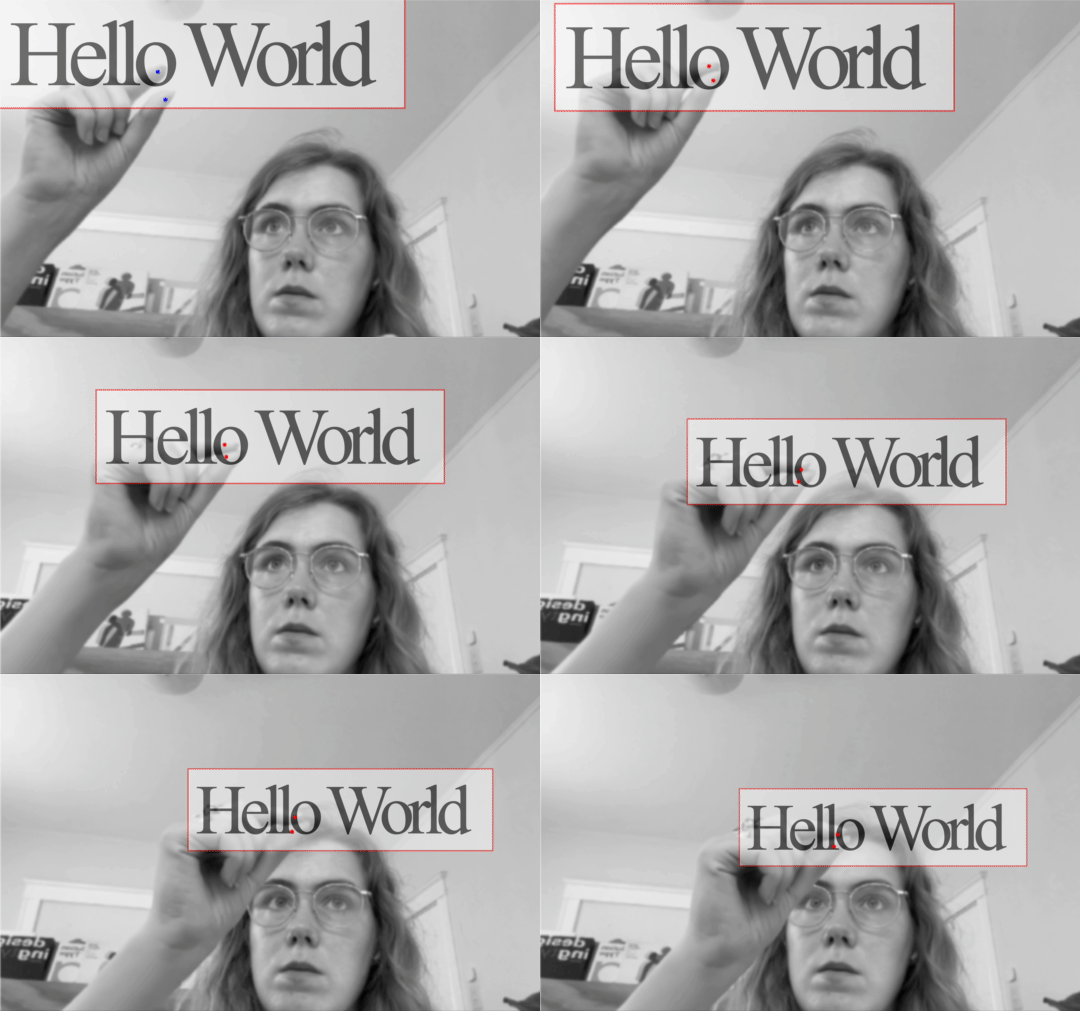 Moving elements
 Scaling elements
Initially, I designed an interface in p5.js, using the p5.speech library by composer Luke DuBois and the p5-to-mediapipe pipeline to make and modify elements directly on the p5.js canvas. While testing this interface, I arrived at the conclusion that if I generated the design elements directly in p5.js, I would need to create a custom class for each imaginable type of element and text styling. While most of this poster design process is admittedly inefficient, that solution would render the implementation of artificial intelligence somewhat redundant. It would require learning commands in a quite specific way and this would steepen the learning curve.
So it would make more sense to use a browser-compatible framework that already has some styling logic embedded in it. Initially, I tested this theory on HTML elements on the page directly, abandoning p5.js and moving to the direct implementation of the Web Speech API and MediaPipe. The speech element alternates between a stylistic feature’s property and its value, so for instance, background color, and pink.
This already made me feel somewhat like a magician, but sometimes the speech API didn’t understand me so well, which in my case with my accent was about half of the time. When I try to say font-family, it would be registered as phonesFamily or fundsFamily, and it mistakes my red for bread. Next to that, always alternating between the property and the value was somewhat annoying, as waiting for it to switch back when making a mistake was taking a long time.
 Styling a box by speech
 Initial styling by speech
Somehow my explanation would need to be converted from human language to concrete commands that the computer could understand. I knew just the thing that could help me: OpenAI’s LLM ChatGPT-4 can take prompts in human language and return code. The fundamental benefit of using an LLM like ChatGPT is that it’s significantly easier to use plain language to describe one’s wishes, without a misunderstood word completely breaking the command. I also needed Node.js, a Javascript runtime environment that, amongst many other things, helps create servers that are essential for keeping credentials private.
At first I made a very simple interface that would take a description and return HTML and CSS only. To make it return code only without any of ChatGPT’s infamous yapping, I found a solution, if you add #ROLE, #USER_PROMPT, and #OUTPUT_FORMAT in your prompt, ChatGPT will return only code.
#ROLE: Web developer. Quick, clever, resourceful, and near-perfect. Silent assistant.
#USER_PROMPT: Generate an HTML element and its corresponding CSS for the following prompt: ${userPrompt}. Include both the HTML and CSS in the response.
#OUTPUT_FORMAT: Source code only
I then continued to create different prompt types, such as one for adding new elements and one for adjusting elements. I also implemented the pose estimation again, so that it is possible to point to objects, move them around and change their features.
The tool has very limited functionality, but the functions it has are fairly reliable. With it, I am able to resize the document and set a background color, generate a variety of elements such as text elements and graphic shapes, modify their style by hovering over them, and move them around the canvas by pinching them. The canvas has a snapping function for elements to align to all corners or on a centerline. It is possible to undo and redo actions, and in the end the document can be saved as a PDF. A surprising side effect is the use of other features of CSS, like animations and gradients.
 Poster generator overview
 Poster generator print
Using this tool took significantly longer than designing the same, simple poster in any digital software. The posters are quite underdesigned for my taste. But, it was fun being able to make it while being on my porch, so in that way the project succeeded.
Possible implementations are in a similar realm the Apple Vision Pro. It’s the next progression after a stand-up desk. However, one is still tied to a screen. While I had to limit this experiment, I can already think of future improvements. First of all, it would be essential to find a way to embed images. This has proven to be tricky without hands as the files on your Desktop can currently not be accessed by the tool through gesture or speech. Another challenge is formatting, all the CSS comes out in a long vertical list, which is not a clean way to write code and can cause bugs.
Poster Generator generate and adjust example
B.2: Morph type
 Morphing a lettershape
What does it feel like to manipulate letter shapes with all your fingers, as if it were a tangible material that can be sculpted? Morphing letter shapes with all fingers you have allows for many more data points than just the cursor. These examples show an overview of some possible modifications.
 Warp
Warp
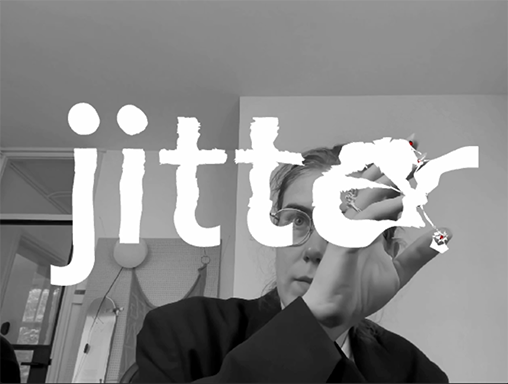 Jitter
 Blow up
I created an interface to do just that, it lets the user try some of these modifications on either a sample text or the entire character set of a font. Then, it lets the user save this file as a new weight of the typeface they uploaded.
The interface currently allows modification types inspired by material: clay, rubber, plush, and glass. You can adjust the strength and the size, and set the color of the text and the interface.
 Morph
Morph
 Warp
Warp
 Zoom
Zoom
The idea of type adapting to a physical is interesting, but maybe more for a lettering perspective than a type design perspective in its current state. I can imagine this has a bigger impact in a VR environment as dynamically set type. Nevertheless, it’s a playful experiment that makes really weird type that would be hard to make in any other way.
 Exported font file
B3: Gesture to motion
What could gesture contribute to motion? When I describe motion to my students, it’s much easier to communicate it by gesture (naturally accompanied by a fitting sound like ‘swoosh’, ‘OOMPH’ or ‘krkrkrkr’) than with words. So why not base motion on a gesture in the first place.
This experiment is fairly simple, it uses p5-to-mediapipe. It lets you draw a motion and adjust the keyframes afterwards, and then record it as an animation.
In the tool, it is possible to adjust the text object, font, and the axis that is transformed in the type, as well as the smoothness of the motion, some mathematical designs like Lissajous curves, and you can set delays for the letters in the word.
It works well for doing quick sketches, but is obviously quite limited. However, it can be useful as a guide to explain motion and map input values into typographic motion design.